Docker Model Runner
Reference Guide
The Docker model runner lets you run the model that is associated with your scenario.
To get started you will need to drag the component (shown below) into your application somewhere (we encourage the left control panel to adhere to our recommended UX).

If you have a model selected for your scenario you should see the RUN MODEL button below which will tell Dais to run your model and pass it all of the model inputs in the store and put them in the inputs.json file for your model to consume within its container.

Properties
You should see the following component properties
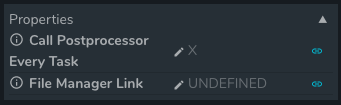
Call Post-processor Every Task
- This is only relevant if you are running multiple seeds with your Docker model runner.
- If enabled the post processing service will be called after each seed finishes, instead of only once after all seeds finish.
- Default:
false - Type:
Boolean
File Manager Link
- This lets you link a unique directory identifier to the File Manager system where you may have stored files for your model by running another service first
- Dais will take the files found at this location in the File Manager and provide them in the
INPUTS_DIRECTORYin your Docker model runner container - Note this needs to be in the format
files/uniqIdentifier - Default:
UNDEFINED - Type:
String